

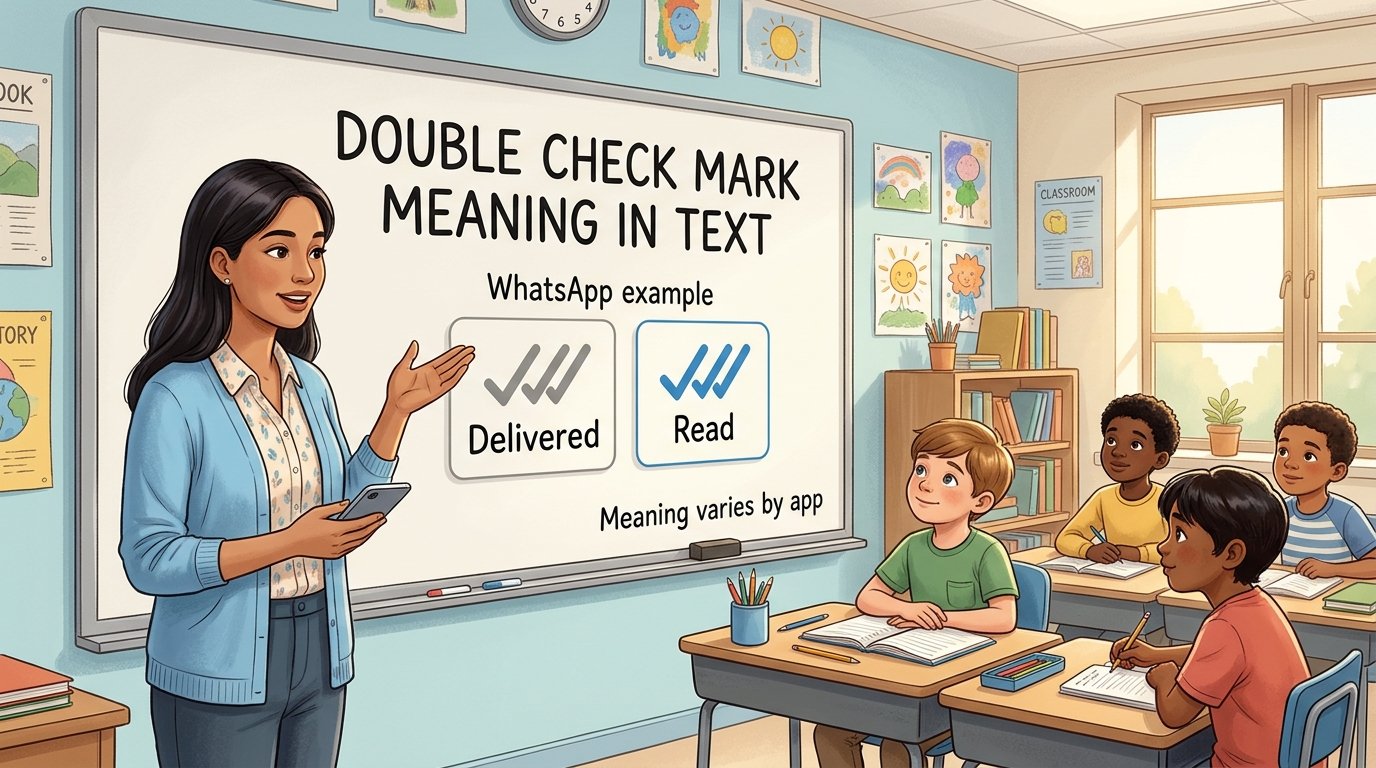
You send a message, two small ticks appear, and you wait for a reply. Does that mean the person has opened your message? The answer depends on the app. A symbol that indicates delivery in one service can indicate reading in another.
The double check mark meaning in text is therefore app-specific. On WhatsApp, two gray ticks indicate delivery, while two blue ticks indicate reading when the relevant receipt is shown. Telegram uses two ticks for a read message in a private conversation. Knowing which system you are looking at matters more than counting ticks alone.
Double Check Mark Meaning in Text: The Quick Answer
Double check marks are usually an interface status indicator beside a sent message. They report a stage in that message’s progress, such as delivery or reading. They do not express agreement, affection, irritation, or a promise to respond.
Start by identifying the app and the exact icon. Color, fill, and accompanying labels may distinguish statuses. A copied pair of check marks inside the message itself is different: those may simply be symbols the sender typed.
| App and context | What the relevant double-check display indicates |
|---|---|
| WhatsApp: two gray ticks | Delivered to the recipient’s phone or a linked device |
| WhatsApp: two blue ticks | Read status is being shown |
| Telegram: two ticks in a private chat | The recipient opened the conversation containing the message |
| Signal: delivered indicator | The message reached the recipient’s device |
| Signal: read indicator | A read receipt is available; both parties must enable receipts |
Sent, Delivered, and Read Are Different Stages
Think about sending a meeting address. Your app accepting or sending the message does not mean the other person has it yet. Delivery tells you it reached the destination defined by that service. Reading is a further status, where the app supports and displays it.
None of those stages confirms that the address is understood or that the meeting is accepted. If you need a decision, ask a question requiring a reply: “Can you confirm that this location works?” A technical status cannot substitute for that answer.
What Two Check Marks Mean on WhatsApp
For an ordinary WhatsApp message, one gray tick means sent, two gray ticks mean delivered, and two blue ticks mean read. Delivery can be to a linked device, so it does not necessarily mean the recipient is holding their phone.
In group chats, the second tick appears after everyone receives the message, and the ticks become blue after everyone reads it. Group behavior should not be interpreted using the timing of one participant’s response alone.
Why WhatsApp Ticks May Stay Gray
WhatsApp allows read receipts to be turned off for individual chats. If you turn them off, you also cannot see other people’s read receipts. Group read receipts are an exception to this privacy setting.
The practical implication is that a missing blue indicator does not prove the message is unread. It gives you less information about reading. Avoid turning an absence of status information into a definite claim about what the recipient has or has not done.
What Two Check Marks Mean on Telegram
Telegram’s official FAQ distinguishes its system from device delivery: one tick means the message reached the Telegram cloud, and two ticks mean the recipient opened the conversation with the message. It does not provide a separate delivered-to-device stage in the same way.
That is why applying a WhatsApp rule to Telegram can produce the wrong conclusion. In a private Telegram conversation, two ticks are not merely a reason to say “it reached a phone.” They communicate the service’s read status.
What the Indicators Mean on Signal
Signal distinguishes sent, delivered, and read with separate status icons. Its delivered status indicates arrival on the recipient’s device. The read status requires both you and your contact to have read receipts enabled.
Look at the complete icon, including whether its check-mark circles are filled, rather than assuming any two checks mean the same thing. If the small symbols are difficult to distinguish, consult the app’s message details or official icon guide instead of applying another app’s color rules.
Does a Read Receipt Mean Someone Understood the Message?
A read receipt is an app’s recorded status, not a test of attention or understanding. Someone may open a conversation while busy, see the first line, and decide to return to the details later. The interface cannot tell you how carefully they considered a long explanation.
This matters when a message contains several actions. “Please bring the folder, review the attachment, and confirm the venue” asks for three different things. Seeing a read indicator does not tell you which, if any, has been completed.
Double Checks but No Reply: What Should You Do?
Choose your next step from the importance of the message and how long you can reasonably wait. A casual photo does not need the same follow-up as a time-sensitive change of meeting place.
For something that needs an answer, ask clearly and include a useful deadline. “Could you confirm by four whether you can bring the projector?” gives the recipient a concrete action. Sending repeated messages about the ticks does not clarify the task.
Helpful Follow-Up Examples
- Casual plan: “When you have a moment, let me know which day suits you.”
- Time-sensitive arrangement: “The room changed to B12. Please confirm before you travel.”
- Work request: “Could you confirm receipt of the attachment and whether you can review it today?”
- Unclear delivery: “I’m checking whether the file reached you; I can send it another way.”
These original examples focus on what you need rather than making assumptions about the other person’s motives. A reply provides information that the status icon cannot.
Do Double Check Marks Mean You Are Blocked?
A check-mark display is not, by itself, a reliable way to diagnose blocking or explain a delayed reply. Delivery and read indicators have specific technical meanings; they are not general reports about the relationship between two people.
If a status does not change, there may be several possibilities. Check your own connection and the app’s help information when troubleshooting. Do not treat one symbol as proof that a particular social explanation must be correct.
What If Someone Types Two Check Marks in a Message?
Manually typed symbols such as “Done ✓✓” belong to the message content. They might emphasize completion, approval, or a personal checklist. They are not automatically the app-generated delivery status.
Check the position of the marks. Icons beside the time usually belong to the interface, while symbols embedded in the sentence are part of what the sender wrote. If you need to know exactly what “done” covers, ask which task was completed.
FAQs About Double Check Mark Meaning in Text
Do two check marks always mean a message was read?
No. Their meaning depends on the app and indicator. Identify the service first, then distinguish its delivered and read statuses. Do not apply one app’s interpretation to every messaging platform.
Can someone read a message without a visible read receipt?
Yes, where the service allows read receipts to be disabled or withheld. A missing receipt means you do not have that confirmation; it does not necessarily prove that the content has never been seen.
Why do I see double checks but no response?
The status does not explain the delay. The person may need time to answer or may not be available. If you need a response, send a clear, proportionate follow-up instead of guessing from the icon.
Does the symbol mean something different from a girl or a guy?
No. App-generated statuses work according to the service’s rules, not the recipient’s gender. They cannot tell you whether someone is interested, annoyed, or intentionally avoiding a conversation.
Can I use two check marks as proof that someone agreed?
No. A delivery or read status does not communicate consent or agreement. Ask for an explicit response when a decision, approval, or confirmation matters.
Conclusion
The double check mark meaning in text depends on the messaging app and the exact status shown. Sent, delivered, and read are different stages, and privacy settings can affect the information available to you.
Use the symbols to understand message progress, then use clear questions to obtain answers. A small status indicator can help with communication, but it cannot explain another person’s attention, feelings, or intentions.

Leave a Reply